
You register on the SARS eFiling website, on a phone or computer with a camera. Log in, open SARS Registered Details, add Payroll Taxes, answer Yes to PAYE and No to SDL, enter the date you first paid a salary that attracted PAYE, submit with the PIN SARS sends you, and do the face check. SARS then gives you a PAYE number: 10 digits, starting with 7. Only you can do this, because SARS checks your face. Once you send us the number, we file the monthly SARS returns and pay over the PAYE.
Before you start
| What | Why |
|---|---|
| Your eFiling username and password | Most people who file their own tax return already have one. If you have never used eFiling, register first: that has its own face check. |
| A phone or computer with a camera | SARS takes a live photo of you at the end. |
| Your cellphone or email | SARS sends a one-time PIN to approve the form. |
| The date you first paid a salary that attracted PAYE | If you are an AskMandla customer, we send you this date. It is the date of the first payslip with PAYE on it. |
| Your bank account details | The form asks for a bank account. If SARS already has your account from your tax return, you pick it from a list. |
Step by step
1. Log in and open SARS Registered Details
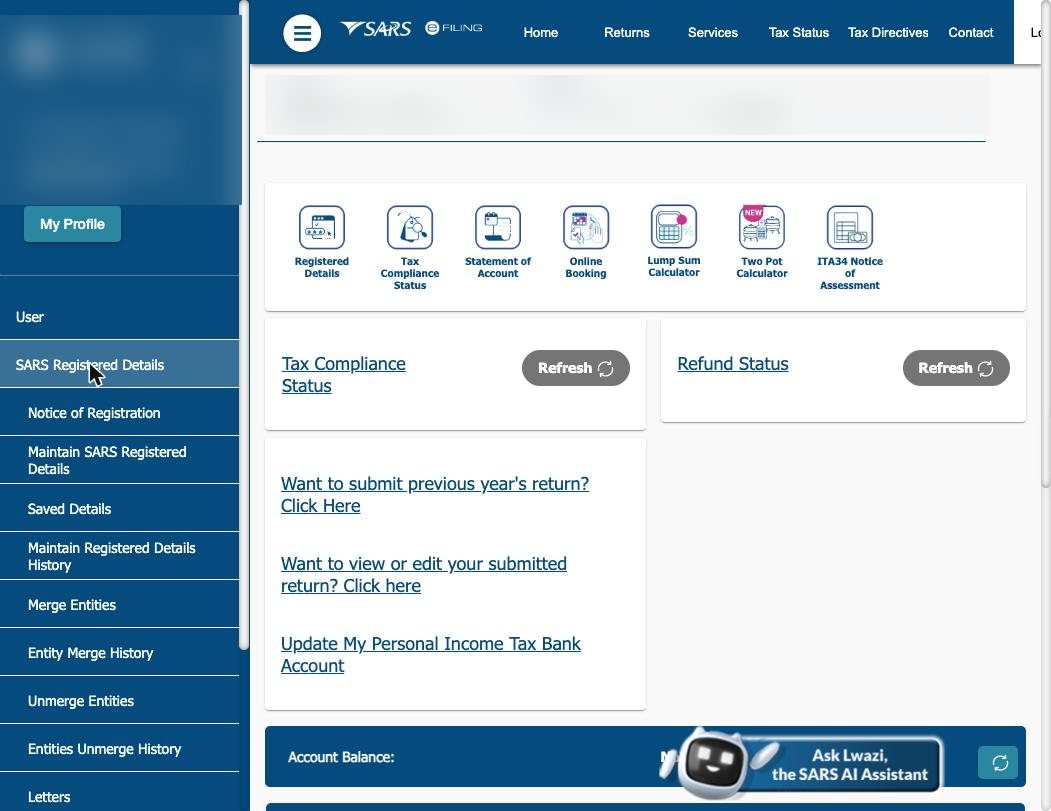
Go to sarsefiling.co.za and log in. In the menu on the left, click SARS Registered Details, then Maintain SARS Registered Details.
2. Confirm and continue
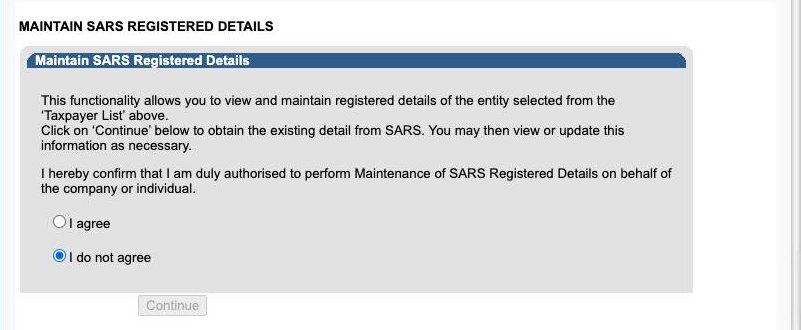
SARS asks you to confirm that you may change these details. Tick I agree, then click Continue.
Some people then see a note about "Tax Subscriptions". Click Proceed. See "If SARS shows a note about tax subscriptions" below if SARS later refuses the registration.
3. Go to Payroll Taxes
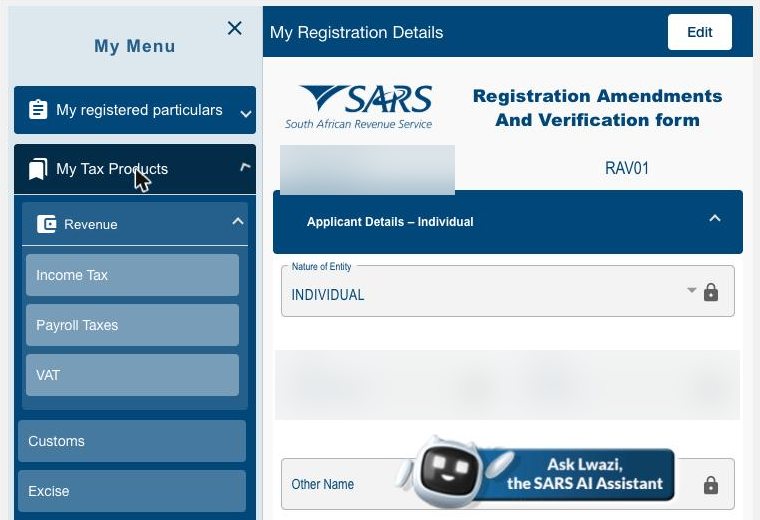
The form opens with its own menu on the left. Open My Tax Products, then Revenue, then click Payroll Taxes.
4. Add a new registration
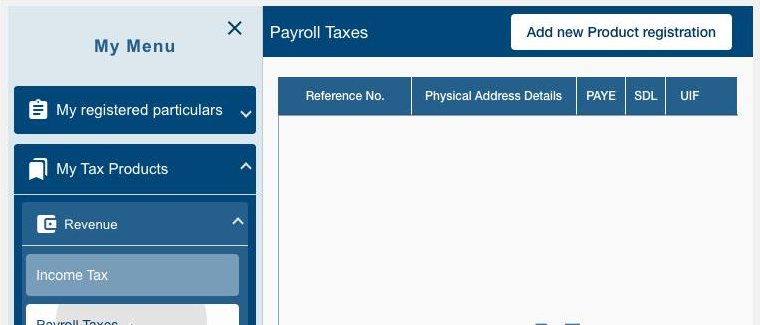
Click Add new Product registration. SARS shows a note that your details have been filled in from your tax profile. Click OK.
5. Answer Yes to PAYE and No to SDL
Scroll down to Payroll Taxes Registration Options. Next to "Would you like to register for PAYE?" choose Y. Next to "Would you like to register for SDL?" choose N. A household only registers for SDL (the Skills Development Levy) if its payroll is R500,000 a year or more. UIF shows "New Registration" by itself; you cannot change it.
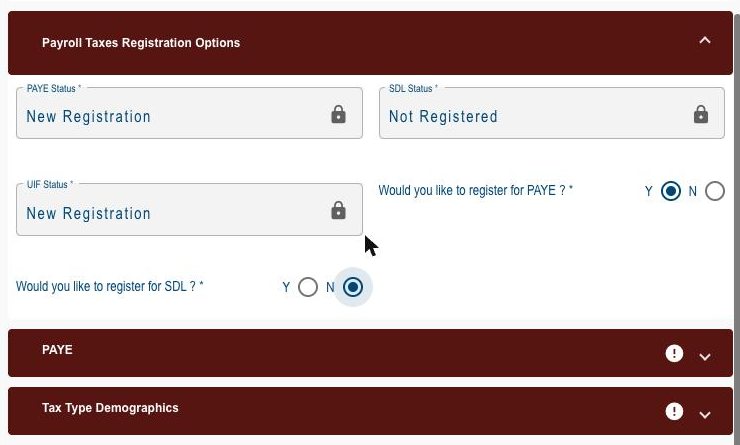
6. Enter the liability date and business activity
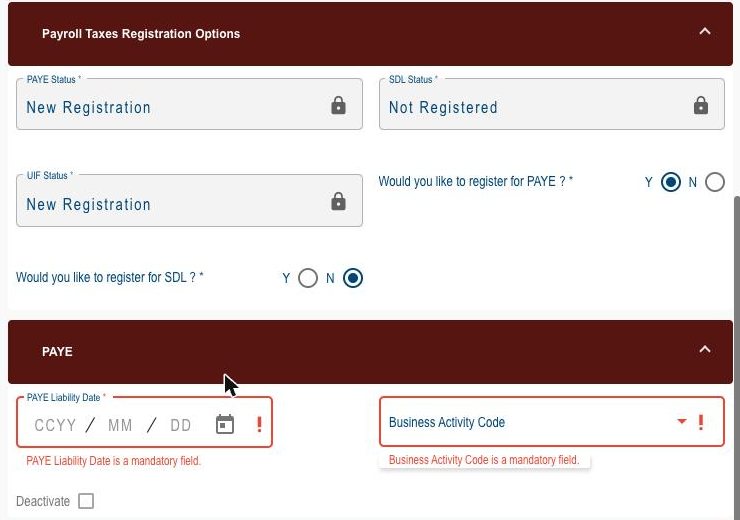
Open the PAYE section.
- PAYE Liability Date: the date you first paid a salary that attracted PAYE. eFiling accepts any date from 1 March of the current tax year. Get it right first time: once the registration exists, only a SARS branch can change it.
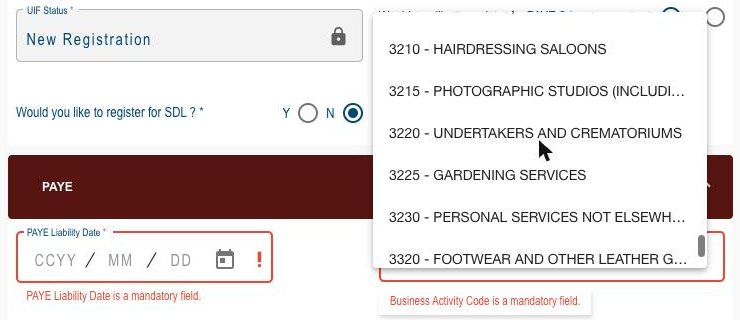
- Business Activity Code: SARS's list has no entry for a private household. Choose 3230 - Personal services not elsewhere classified.
7. Add a trading name and your bank account
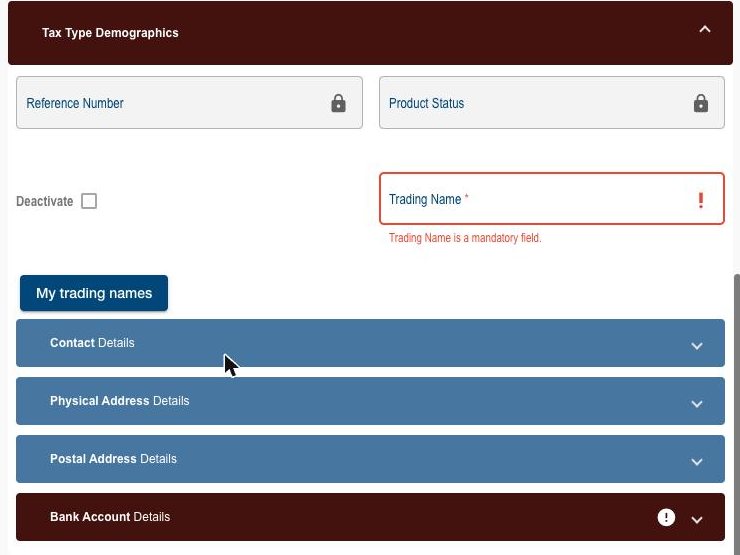
Open Tax Type Demographics.
- Trading Name: a household has none, so type your initials and surname.
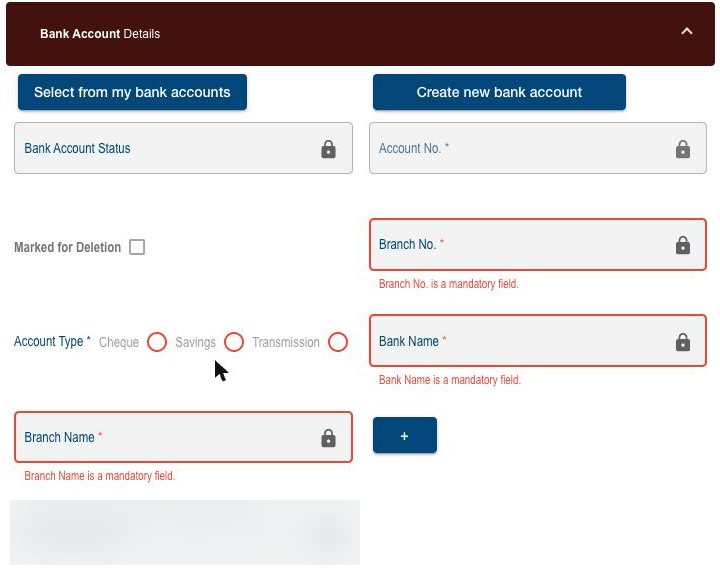
- Bank Account Details: click Select from my bank accounts and pick your account. If it is not there, click Create new bank account.
Your contact details and addresses are already filled in. Check them and your bank account carefully. If SARS asks for documents, your proof of address and bank confirmation must show the same details as this form.
8. Submit and do the face check
Click Done, then Submit form at the top. Choose whether SARS sends the PIN by SMS or email, and enter it. SARS then asks you to take a live photo. Turn your screen brightness up, face the camera in good light, and follow the instructions on screen. You have three tries.
What happens next
- If everything matches, SARS gives you a PAYE reference number: 10 digits, starting with 7. You can see the notice of registration on eFiling under SARS Registered Details, then Notice of Registration.
- If SARS wants documents, it opens a verification case. You find the list on eFiling under SARS Correspondence. Upload them within 21 business days, or SARS cancels the application and you start again. This can happen even when the face check passes.
- If you have no camera, book an appointment at a SARS branch and a SARS official helps you.
If SARS shows a note about tax subscriptions
After you click Continue, SARS may say that your profile "does not include all your tax subscriptions" and that you must confirm them "via the efiling Merge application or at a SARS branch before your new Tax subscription will be allowed".
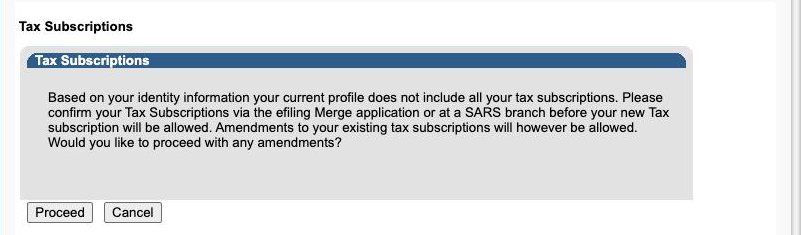
This means SARS holds another tax registration under your ID number that is not linked to your eFiling profile. Before you submit, make sure you are tax compliant, with your returns filed and nothing owed to SARS. If you are not, SARS can check the registration before it issues the number. In the menu on the left, under SARS Registered Details, click Merge Entities and follow the steps, then start again from step 1. If that does not work, book an appointment at a SARS branch. Tell us if this happens to you.
If you are an AskMandla customer
Send us the PAYE number on WhatsApp or by email. We do the rest: we file the monthly SARS returns for the past months and from now on, and pay over the PAYE we hold for you. That is included in your R49 a month.
Questions people ask
Why can't AskMandla register me?
Since 25 August 2025 SARS checks the face of every person who registers for PAYE on eFiling. Only you can do that. Once you are registered, we file and pay on your behalf.
I am not a South African citizen. Can I still register?
Yes. If you have a South African ID number, the steps are the same. If you only have a passport, SARS may ask you to verify your identity at a branch. Ask us if you get stuck.
Do I also need to register for SDL?
No. Choose N for SDL. A household's payroll is far below the R500,000 a year at which SDL applies.
Why is my liability date in the past?
Because PAYE was deducted from those payslips. The liability date tells SARS which months to expect returns for, so we can file the earlier months for you.